
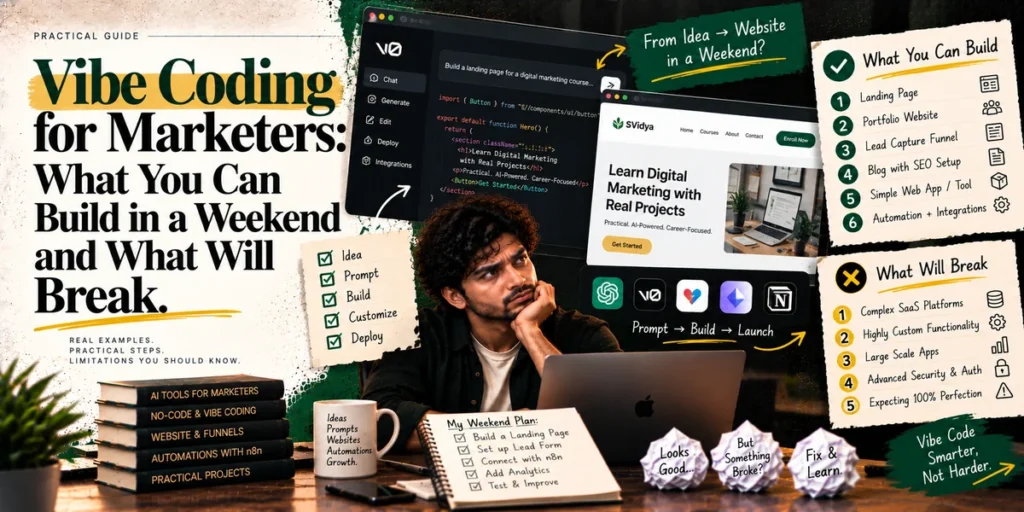
You have heard about vibe coding. You describe what you want in plain language, and an AI tool builds it. No coding, no developers, no waiting.
So you try it. You open a tool. You type a description. Something appears. You are amazed for about ten minutes.
Then you try to connect it to your actual data. Or add payments. Or make it work on mobile. And the whole thing starts to break.
Vibe coding is real. It is also misunderstood. Some things work great in a weekend. Some things should never be built this way.
Direct Answer
Vibe coding works well for simple, self-contained tools: landing page calculators, forms, dashboards, small internal tools. It breaks on anything that needs authentication, payments, sensitive data, or complex logic. Build the simple things fast. Do not build the critical things this way.
What Vibe Coding Actually Is
Vibe coding is using AI to write code for you. You describe what you want. The AI produces working code. You test it. You refine it by describing what to change.
The tools have become good enough that a non-developer can build a working prototype in hours. That is a real shift.
But the AI is producing code it has never tested. It does not know your data. It does not know your edge cases. It does not know the regulations you operate under. You do.
That is the whole game. The AI writes. You verify. If you skip the verification, you get a working-looking thing that breaks in production.
7 Things You Can Build in a Weekend
1. Landing Page Calculators
A simple tool where visitors enter a few numbers and get a result. A cost of ads calculator. A leads needed calculator. A revenue projection tool.
Why it works: The logic is simple. There is no user data. There is no payment. There is no login. Input, math, output. The AI gets this right quickly.
Where it fits: Lead magnets. Sales pages. Gated tools that collect an email.
2. Lead Capture Pages
A landing page with a form, a thank-you page, and a WhatsApp or email trigger.
Why it works: Simple structure, simple integration. If you keep the form short and the next step clear, this is a safe build.
Where it fits: Any campaign landing page. Any one-off promotion.
3. Internal Dashboards
A simple dashboard that pulls data from one or two sources and shows it in one place. Your ad spend, your leads, your revenue, all on one screen.
Why it works: It is for you, not for public users. If a bug appears, you fix it. Nobody else is affected.
Where it fits: Freelancers managing multiple clients. In-house marketers tracking campaigns.
4. Content Repurposing Tools
A small tool that takes one piece of content and reformats it for different platforms. A blog post into social captions. A video transcript into a tweet thread.
Why it works: The logic is pattern-based. The AI is good at this. The output is reviewed by a human before use.
Where it fits: Personal content workflows. Small content teams.
5. Quiz or Assessment Tools
A short quiz that gives visitors a score or a recommendation. Which marketing channel fits your business. How ready are you for SEO.
Why it works: Simple flow, clear output. The result is a lead magnet or a starting point for a conversation.
Where it fits: Lead generation. Audience segmentation.
6. Simple ROI Calculators
A client-facing calculator that shows how much they could save or earn by using your service.
Why it works: The math is predefined by you. The user enters inputs. The output is a clear number. This is one of the highest-converting lead magnets.
Where it fits: Agency pitches. Service pages. Sales conversations.
7. Portfolio or Notion-Style Display Sites
A clean, one-page site that shows your work in a scannable format.
Why it works: Simple layout. No dynamic data. No login. No payment. If the content is right, the page works.
Where it fits: Freelance portfolios. Personal brand sites. Project showcases.
5 Things That Will Break
1. Anything Involving Payments
You can build a page that looks like it takes payments. You cannot responsibly build payment processing this way.
Why it breaks: Payment flows involve security, compliance, fraud handling, refunds, and error cases. A tiny mistake means real money lost and real customer data at risk. Use a proper payment provider’s built-in checkout.
2. Anything Involving Login or User Accounts
A tool that lets users sign up, log in, and store personal data.
Why it breaks: Authentication is one of the easiest places to introduce vulnerabilities. Password storage, session handling, and recovery flows all need real expertise.
3. Anything Touching Sensitive Data
Health records, financial data, personal identification, children’s data.
Why it breaks: These categories are regulated. Mistakes carry legal risk, not just technical risk. This is not a weekend project.
4. Anything With Complex Business Logic
A booking system with multiple rules. A pricing engine with conditional discounts. A workflow with branching conditions.
Why it breaks: The AI produces code that handles the happy path. It misses edge cases. Edge cases are where real businesses live.
5. Anything You Cannot Test Thoroughly
If you cannot list the scenarios the tool needs to handle correctly, you cannot verify the build. You will not know it is broken until a customer hits the bug.
Why it breaks: Untested code is broken code waiting to happen. Vibe-coded tools often skip the edge-case thinking that real engineers do by habit.
Comparison Table
| Project Type | Safe to Vibe Code? | Why |
|---|---|---|
| Landing page calculator | Yes | Simple logic, no user data |
| Lead capture page | Yes | Simple form and trigger |
| Internal dashboard | Yes | Private, you fix bugs |
| Content repurposing tool | Yes | Pattern-based, human-reviewed |
| Quiz or assessment | Yes | Simple flow, clear output |
| ROI calculator | Yes | Predefined math, no user data |
| Portfolio display site | Yes | Static, no dynamic data |
| Payment processing | No | Security, compliance, money at risk |
| Login and user accounts | No | Authentication is security-critical |
| Sensitive data handling | No | Regulated, legal risk |
| Complex business logic | No | Edge cases get missed |
| Untestable tools | No | You will not know it is broken |
What I Actually Did
When I first tried vibe coding, I built a calculator. A simple one, for a landing page. It took two hours. It worked. It captured emails. It has run for months with almost no issues. That is what vibe coding is good at.
Then I tried to build something more ambitious. A small tool with user accounts. It looked fine on the surface. Then I started testing it and found problems. Password reset did not work properly. Sessions did not expire. One error in the wrong place exposed data that should not have been visible.
I stopped the project. The lesson was clear. Vibe coding gives you a working prototype fast. It does not give you a secure, reliable product. For anything that touches user data, money, or critical flows, you need real development or real oversight.
Since then, I have used vibe coding for what it is good at. Landing page tools. Internal dashboards. Content helpers. Simple things that do not risk anything if a bug appears. For everything else, I build properly.
Mistakes to Avoid
Assuming “it works” means it is safe. It works on the happy path. The edge cases are where the problems are.
Publishing without testing thoroughly. Test with real data, not with your own numbers.
Skipping the review step. Even with vibe coding, a developer should review anything going live to real users.
Building customer-facing tools without a fallback plan. Every tool breaks eventually. What is your backup.
Storing user data you do not need. The less you collect, the less risk you carry.
Keeping the code a mystery. If you cannot explain what a tool does and how, do not put it in front of customers.
Practical Checklist Before You Ship a Vibe-Coded Tool
- ☐ I know exactly what the tool does and what it does not do.
- ☐ It does not touch payments, login, or sensitive data.
- ☐ I have listed the edge cases it needs to handle.
- ☐ I have tested it with realistic data, not ideal data.
- ☐ I have a developer or experienced person review it before launch.
- ☐ I have a fallback plan if the tool goes down.
- ☐ I am not storing data I do not need.
- ☐ The tool is not part of a critical customer flow.
- ☐ I can explain what it does to someone else clearly.
- ☐ I have not used vibe coding for anything regulated.
FAQ
Q: Do I need to know how to code to vibe code?
A: Not to start. But the more you understand about how software works, the better you will be at spotting problems before they reach users.
Q: Is vibe coding safe for a business tool?
A: For simple internal tools, yes. For anything customer-facing that involves data or payments, no. Use real development for those.
Q: What is the most common failure in vibe coding?
A: Edge cases. The tool works for the common path. It breaks on the rare path, and the rare path is often what a real customer does first.
Q: Can I use a vibe-coded tool for a client project?
A: Only for simple, low-risk tools. For client work involving data, payments, or critical flows, do the development properly or bring in a developer.
Q: How do I test a vibe-coded tool properly?
A: List the scenarios it needs to handle. Test each one with realistic data. Try to break it. If you cannot break it after an hour of trying, you are probably fine.
Q: Will vibe coding replace developers?
A: No. It changes what non-developers can build alone. It does not replace the need for real engineering on serious products.
End CTA
If you want to learn what to build with AI tools and what to leave to proper development, look at the SVidya homepage. Vibe coding is covered in the 22-week live program, with a focus on what works and what breaks. Every student builds a small tool and tests it properly. Read the curriculum and check whether it fits your goals. If it does not, that is fine too. The important thing is that you build the simple things fast, and do not break the important things.
Author Box
Shubhankar Vashist is the founder of SVidya, based in Delhi. He has 6+ years of marketing experience across healthcare, pharma, cosmetics, e-commerce and agencies. He teaches digital marketing by making students build real assets.