
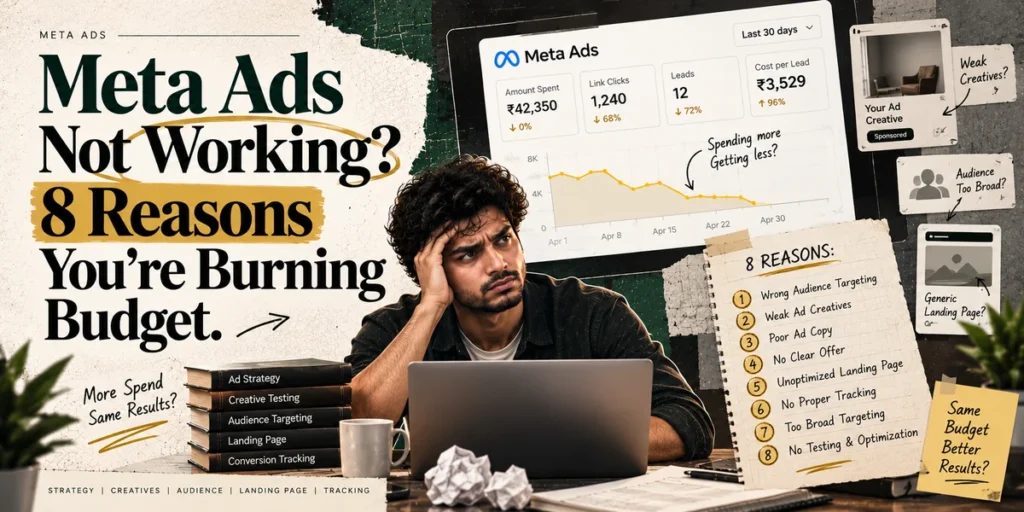
You set up a campaign. You picked an audience. You wrote the ad. You pressed launch.
Two weeks later, you have spent money and have almost nothing to show. A few clicks. Maybe one or two leads. Cost per result is high. You are not sure if the problem is the ad, the audience, the budget, or the platform.
Most likely, it is one of eight common mistakes. If your Meta Ads not working, fix the mistakes, and the same campaign often starts working.
1. You Are Targeting Too Broadly
You picked “India” as your location. You picked an age range from 18 to 65. You left interests open. You told Meta to find “anyone who might be interested”.
Meta will do what you ask. It will spend your budget showing your ad to anyone. Broad targeting only works when you have a very strong creative and a very clear offer. For most small advertisers, broad targeting just burns money.
Fix: Narrow the location to the cities or pin codes you actually serve. Narrow the age range to your real customer. Add one or two interest signals that match your audience, or upload a customer list and let Meta build a lookalike. Specific targeting usually beats broad targeting when budgets are small.
2. Your Creative Is Boring
Meta is a feed. Your ad competes with photos of friends, family, and funny videos. A boring ad loses before the message even lands.
Common signs of a boring creative: stock photos of people shaking hands, text-heavy images, generic images that could belong to anyone, videos that take ten seconds before saying anything useful.
Fix: The first three seconds decide everything. Lead with the problem, the result, or the customer. Use a real photo or a real short video. Face-to-camera, even from your phone, usually beats polished stock. Test three creatives at once, not one, so you learn which direction works.
3. The Hook Fails in the First Three Seconds
Even a good video can fail if the opening does not grab the viewer. Meta users scroll fast. If the first line of text, or the first frame of the video, does not connect, they move on.
Fix: Write ten hooks before you write the ad. Test them. Some examples that work: “You are paying for ads that nobody clicks.” “If you run a small clinic, this changes your patient flow.” “Stop guessing what your customers want.”
The hook should make the viewer think “this is about me”. If it does not, the rest of the ad does not matter.
4. Your Landing Page Does Not Match the Ad
The ad promised one thing. The landing page delivers another. The visitor gets confused and leaves.
This is one of the most common reasons for a high cost per lead. The ad mentions a free consultation, but the page asks the visitor to fill a long form. The ad shows a product in a specific colour, and the page shows something different. The ad talks about one problem, and the page talks about ten.
Fix: The landing page headline should match the ad headline. The offer should be the same. The visual should feel like a continuation. Nothing new should appear on the page that was not implied in the ad.
5. You Are Judging Too Early
You launched the campaign last night. You checked this morning. Nothing has happened. You panic and change the ad.
Meta needs time to learn. The first 24 to 72 hours are usually noisy. The algorithm is testing placements, audiences, and times. Judging on day one is like judging a cricket match after the first over.
Fix: Give the campaign at least three to five days, or enough spend to reach a meaningful number of impressions. Do not touch the ad during the learning phase. Wait, then look at the pattern, not the day.
6. Your Budget Is Too Small to Learn
A daily budget of Rs 100 or Rs 200 sounds safe. But Meta needs a certain amount of spend to test and optimise. A very small budget means the campaign never collects enough data. It keeps guessing.
Fix: If you can, start with a daily budget large enough to gather signal in a few days. If your budget is truly tiny, then accept slower learning, and judge the campaign over a longer window. Do not compare a Rs 200 daily campaign to a Rs 2,000 daily campaign. They learn at different speeds.
7. No Tracking Set Up
You have no pixel installed. Or the pixel is installed but the events are not firing. Meta has no idea who converted. So it optimises for the wrong action. It optimises for clicks that lead nowhere, because that is all it can see.
Fix: Install the Meta pixel on your website. Set up the standard events that matter to you, like Lead or Purchase. Test that they fire correctly. Use the Events Manager to confirm. Without tracking, Meta is guessing. With tracking, Meta can actually improve.
8. You Blame Meta Before Checking Your Offer
The audience is fine. The creative is fine. The tracking is fine. But nobody is converting. Why? Because the offer itself is not compelling.
If you are asking a stranger to pay full price for something they have never heard of, the ad cannot fix that. If you are asking for too much commitment too soon, the ad cannot fix that either. Offers solve problems. If the offer does not solve a felt problem, no amount of ad spend will save it.
Fix: Test the offer, not just the creative. Free consultation instead of a paid call. A specific lead magnet instead of a generic newsletter. A clear promise instead of a vague benefit. Small offer changes often move the numbers more than any creative test.
Comparison Table
| Mistake | What It Looks Like | Fix |
|---|---|---|
| Too broad targeting | “India, 18 to 65, all interests” | Narrow location, age, and one interest |
| Boring creative | Stock photos, text-heavy images | Real photos, first three seconds matter |
| Weak hook | Ad starts with brand name | Start with the problem or the result |
| Mismatch landing page | Ad promises A, page delivers B | Match headline, offer, and visual |
| Judging too early | Checking results overnight | Wait 3 to 5 days or enough spend |
| Tiny budget | Rs 100 to 200 daily, judging fast | Either raise budget or wait longer |
| No tracking | No pixel or events not firing | Install pixel and test events |
| Weak offer | Generic promise, high commitment | Test a better offer, not just new ads |
What I Actually Did
When I first started running Meta ads, I made almost all of these mistakes. I targeted broadly because I thought more people meant more chances. I used stock photos because they looked professional. I judged my campaigns after a day and changed them constantly. My cost per lead was terrible.
The biggest shift came when I fixed two things. I narrowed the audience, and I made the landing page match the ad. Same budget. Same platform. Same offer. The cost per lead dropped within a week. The creative did not change. The targeting and the page did.
Later, I learned to leave campaigns alone for at least three days. That single rule stopped me from killing promising ads before they had a chance to learn. My results got much more stable.
That experience shapes how I now teach Meta Ads. Every student runs a real campaign, not a mock. Because the mistakes above only become clear when you have real money on the line.
Mistakes to Avoid
Changing the campaign every day. Every change restarts the learning phase. Let it run.
Testing five variables at once. If you change the audience, creative, and offer at the same time, you learn nothing. Change one thing.
Copying an ad that worked for someone else. Their audience, offer, and page are different from yours. What worked for them may not work for you.
Trusting the platform’s default recommendations blindly. Sometimes they are right. Sometimes they optimise for spend, not for your result. Check what you are actually paying for.
Skipping tracking because it feels technical. Tracking is not optional. Without it, every other fix is guesswork.
Blaming the platform when the offer is weak. Meta will show your ad to the right people. It cannot make them want something they do not want.
Checklist Before Your Next Campaign
- ☐ My location, age, and interest targeting match my actual customer.
- ☐ I have at least three creatives to test, not one.
- ☐ My hook grabs attention in the first three seconds.
- ☐ My landing page matches my ad, in headline, offer, and visual.
- ☐ I will not judge the campaign for at least three days.
- ☐ My daily budget is big enough to gather real signal.
- ☐ My pixel is installed and my events are firing correctly.
- ☐ My offer is specific, low-commitment, and clearly valuable.
FAQ
Q: How long should I run a Meta ad before judging it?
A: At least three to five days, or enough spend to reach a meaningful number of impressions. Never judge overnight.
Q: Is broad targeting always bad?
A: No. Broad targeting can work with strong creative and clear offers. For most small advertisers, though, narrow targeting performs better because the budget goes to the right people.
Q: How many creatives should I test?
A: At least three at a time. One is not a test. It is a guess.
Q: What is the most common mistake in Meta Ads?
A: Mismatch between the ad and the landing page. The visitor clicked on one promise and arrived at another.
Q: Do I need a big budget to run Meta Ads?
A: No, but you need enough to gather signal. If your budget is very small, judge over a longer window and do not expect the same speed as bigger campaigns.
Q: Should I follow Meta’s recommendations to increase budget?
A: Sometimes yes, sometimes no. Check your cost per result and your overall return before scaling. Scaling blindly usually burns money.
End CTA
If you want to learn Meta Ads by running real campaigns with feedback on your targeting, creative, tracking, and offer, look at the SVidya homepage. Meta Ads is one of the modules in the 22-week live program. Every student runs a real campaign and gets reviewed before scaling. Read the curriculum and check whether it fits your goals. If it does not, that is fine too. The important thing is that your next campaign has fewer of these eight mistakes.
Author Box
Shubhankar Vashist is the founder of SVidya, based in Delhi. He has 6+ years of marketing experience across healthcare, pharma, cosmetics, e-commerce and agencies. He teaches digital marketing by making students build real assets.